
Find your Blockchain.com recovery path
Use this table to find the right section. Some problems have a simple fix. Others may need offline password testing.
Lost your Blockchain.com password without the 12-word recovery phrase?
First, figure out whether you lost the main wallet password, the second password, or both. These passwords protect different parts of the wallet, so we test them in different ways.
Blockchain.com cannot reset either password for your DeFi Wallet. Its password reset applies only to the Custodial Trading Account. To recover a DeFi Wallet password, Crypto Asset Recovery needs the encrypted wallet backup and your best password guesses.
What is a Blockchain.com wallet backup?
A wallet backup is an encrypted copy of your wallet data. It may be an encrypted payload stored by Blockchain.com or an older file named wallet.aes.json.
You do not need to have the file on your computer. Blockchain.com retains the encrypted payload on its servers. Your Wallet ID, also called a GUID, tells us which payload belongs to your wallet. With your permission, Crypto Asset Recovery can often retrieve it and test your password guesses offline.
Which password did you lose?
| Password you lost | What you see | What we need from you |
|---|---|---|
| Main wallet password | Blockchain.com rejects the password before the wallet opens. | Your wallet backup, or your Wallet ID and permission to retrieve it, plus your main-password guesses. |
| Second password | Blockchain.com accepts the main password and asks for the Second Password. A wrong entry returns Wrong password, and the wallet does not open. | The wallet backup, your second-password guesses, and either the correct main password or enough clues to recover it first. |
| Both passwords | You cannot get past the main password, and you do not know the second password either. | The wallet backup and your guesses for both passwords. We test the main password first and then the second password. |
Do you have a DeFi Wallet or a Trading Account?
Blockchain.com offers two separate products. In the DeFi Wallet, you control the keys. In the Custodial Trading Account, Blockchain.com holds the assets for you. Blockchain.com's account and wallet guide explains the difference.
Look for these signs in old emails, screenshots, statements, or exports:
- DeFi Wallet: You have a Wallet ID, an old Blockchain.info account, a 12-word recovery phrase, a
wallet.aes.jsonfile, or a mobile cloud backup. - Second-password wallet: Blockchain.com accepts the main password and then shows a Second Password box. A wrong entry returns Wrong password.
- Custodial Trading Account: Your records say Trading Account or Cash Account. Bank deposits, bank withdrawals, cash balances, withdrawal holds, and Trading Account CSV files also point to this account.
- Older Blockchain.info wallet: You have a
wallet.aes.jsonfile or a recovery phrase that is not 12 words long.
An identity check or a Buy or Sell order does not prove which product held your funds. One person can have both a Trading Account and a DeFi Wallet.
If your records do not make the answer clear, ask Blockchain.com Support to check your email address. Its support team can see Trading Account balances, but it cannot see DeFi Wallet balances.
You may have more than one Wallet ID. Enter each email address you may have used in the official login flow, then approve the verification email. Blockchain.com may show several Wallet IDs. It says the first one is usually the newest. Keep each ID private and label it by date or device.
1. You lost the DeFi Wallet password without the 12-word recovery phrase
You can start without a wallet file on your computer. If you know the Wallet ID or GUID, Crypto Asset Recovery can often retrieve the encrypted payload with your permission. We can then test your password guesses offline.
Older Blockchain.info users may find a wallet.aes.json attachment in a signup or automatic-backup email. You may also have downloaded this file from the old web wallet. Ordinary wallet use did not automatically save the file on your computer.
Treat the backup like a sensitive financial file. Keep the original unchanged and work from a copy. Do not rename its fields or change the JSON. Never post it online or upload it to a random “wallet unlock” website.
An old backup may still work. However, it may not include addresses or changes added after the backup date. A known receiving address can help you check that you found the right wallet. It cannot unlock the wallet.
A Wallet ID does not unlock anything either. It tells Blockchain.com which encrypted payload belongs to you. Blockchain.com does not offer a simple download button for every old wallet. Avoid guides that tell you to paste unknown code into your browser.
If you have the encrypted wallet data and some idea of the password, offline testing may recover it. The software checks each possible password against the backup. It does not keep trying passwords on Blockchain.com's website.
Ask Crypto Asset Recovery to evaluate your wallet.
2. You lost the second password without the 12-word recovery phrase
Crypto Asset Recovery can also test a lost second password. We need the wallet backup and your second-password guesses. We also need the correct main password, or enough clues to recover the main password first.
Some older Blockchain.com wallets use two layers of encryption. The main password protects the wallet backup. A separate second password protects the private keys inside it.
In the current login flow, Blockchain.com accepts the main password and then asks for the Second Password. A wrong entry returns Wrong password, and the wallet does not open.
Older versions behaved differently. They could open the wallet first and ask for the second password only when you tried to send funds. That old behavior is no longer a good way to identify a current second-password problem.
Recovery software first uses the main password to open the outer layer of the wallet backup. It can then find the data used to check the second password. The software tests your second-password guesses against that data offline.
Read our second-password recovery guide, or ask Crypto Asset Recovery to evaluate the wallet.
How Blockchain.com password recovery works
Crypto Asset Recovery uses your wallet backup and password clues to build a focused offline search.
- Get the encrypted wallet backup. We use your
wallet.aes.jsonfile. If you do not have the file, we may retrieve the payload from Blockchain.com with your Wallet ID and permission. - Build the password candidates. A candidate is one possible password. You tell us the words, dates, symbols, and patterns you may have used. We turn those clues into a list of likely passwords.
- Test the candidates offline. We test the list against the encrypted backup on computers we control. We do not send each guess to Blockchain.com.
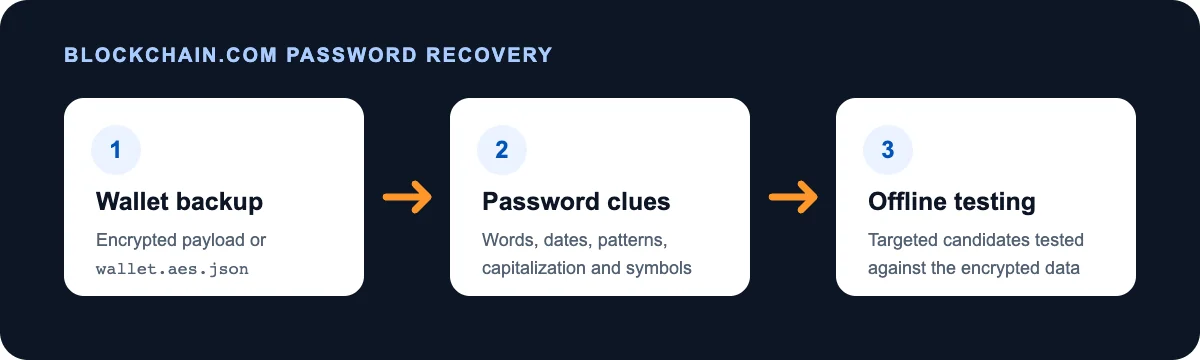
The encrypted wallet backup and your password clues make targeted offline testing possible.
If you lost both passwords, we test the main password first. Once it opens the outer layer, we can test the second password.
What Crypto Asset Recovery needs to test the password
You do not need to search every old device before you contact us. We need two things to test the password:
- The wallet backup: a
wallet.aes.jsonfile or the encrypted payload linked to your Wallet ID or GUID - Your password clues: your best guesses and any patterns you may have used
If you lost both passwords, we may be able to recover them one at a time. We test the main password first and the second password next.
If you already have a wallet backup, keep one copy unchanged. Do not upload it to a website you do not trust. Do not send your recovery phrase through a normal contact form.
3. Email approval or 2FA blocks wallet-backup retrieval
If you do not have a backup file, we may be able to retrieve the encrypted payload. We use your Wallet ID and your permission to make the request. Blockchain.com may ask you to approve the request by email or with two-factor authentication, also called 2FA.
If the email never arrives, follow our Blockchain.com authorization email checklist. If you no longer have the email account or 2FA method, use Blockchain.com's official identity and 2FA reset process.
Fixing email or 2FA access does not recover the wallet password. It lets us get the encrypted wallet backup that we need for offline testing.
Build better password candidates
A password candidate is one possible password. A focused search does not try every string of letters and numbers. It tests the patterns that you were likely to use when you made the wallet.
Start with passwords from the time when you created the wallet. Write down anything you remember about how you made them:
- words, names, places, or phrases you used more than once
- dates or numbers added before or after a word
- capital letters you often used
- swaps such as
@fora,3fore, or0foro - spaces, hyphens, periods, or underscores
- changes you made after a website rejected your first choice
- typing mistakes, doubled letters, missing letters, or phone autocorrect
- the keyboard layout you used, such as QWERTY, QWERTZ, or AZERTY
- the language you used and any accented letters
Do not judge an old password by today's rules. Blockchain.info and Blockchain.com changed their password rules over time. A password that worked years ago may not meet today's rules.
Write down patterns instead of saving every password you still use. For example, “old pet name + two-digit year + symbol” is a useful pattern. Keep your notes offline and use them only for this wallet case.
Check old password managers and browser profiles from the time when you used the wallet. A saved password may belong to a different Wallet ID. Check the date and account before you decide that it is wrong.
Do not send hundreds of guesses through the live login page. It is slower and less private. It may also trigger security limits. Offline software can test planned changes without sending each guess to the website.
When offline password testing makes sense
Offline testing is worth trying when you have:
- The encrypted wallet backup.
- Password clues that make the search smaller.
For example, you may remember a base word but not the capital letters, date, or symbol. That can create thousands or millions of possible passwords. A computer can test a set like that. A long, random password with no remembered parts may create too many possibilities.
Open-source tools such as BTCRecover show that software can test Blockchain.com main and second passwords against encrypted wallet data. Setting up a safe and useful search takes technical skill. Crypto Asset Recovery builds the password list, sets up the search, and runs the tests for you.
When professional recovery may help
You may want help if you have the wallet backup but cannot build or run the search. A recovery company can also check an old wallet format or confirm that you have a second-password problem.
Before you hire anyone, ask:
- What files and information do you need?
- Will you test the passwords offline?
- How will you protect my wallet backup and password clues?
- What will I pay, and when will I pay it?
- When will you delete my data?
- What would make the search too large or too costly?
No provider can guarantee a result. Avoid anyone who promises success before looking at the case. Do not pay an upfront “release” fee to a stranger. Ignore recovery offers that arrive without you asking for help. Never give remote access to a device that holds wallet keys.
Why choose Crypto Asset Recovery for a Blockchain.com wallet?
We focus on password recovery for wallets where you control the keys. We look at the wallet type and the clues you remember. Then we build a password list for your case instead of running a blind search.
Before we start, we explain what we need, how we protect it, how large the search may be, and what the fee will be. We test passwords offline. You send wallet records and password clues through our private recovery process, not a public post or forum.
We will also tell you when your clues do not support a useful search. No recovery company can make a weak password clue into a certain result.
Crypto Asset Recovery has been featured by the BBC, Forbes, and VICE. You can also read client testimonials before you share case details.
Blockchain.com's current login and recovery troubleshooting guide refers qualifying locked-wallet cases to Crypto Asset Recovery.
Other Blockchain.com recovery routes
The options below are often faster than password testing. They use a wallet that still works, an existing backup, or Blockchain.com's account-recovery tools.
4. The wallet still opens on one device
Protect the device, app, or browser profile that still works. Do not log out. Do not uninstall or reinstall the app or extension. Do not clear its data, update it, reset browser sync, or erase the device. Do not test a backup by changing your only working copy.
While the wallet is open, write down the Wallet ID and use the built-in backup tool. On the web, go to Profile → Security → Recovery Phrase → Backup. In the mobile app, go to Profile → Security → Backup Phrase. Blockchain.com's wallet backup guide has the current steps.
Write the recovery words in the right order and keep them offline. Do not save them in a screenshot, email, chat, or cloud note. Blockchain.com support will not ask you to send the phrase.
The wallet may ask you to confirm the words. This check can catch a copying mistake. It does not prove that the phrase will restore every address. Blockchain.com says the phrase does not back up imported Bitcoin addresses. Keep the private keys or a full encrypted backup for those addresses.
If you test a restore, use another trusted device or browser profile. Leave the working wallet alone. If you are not sure that the backup covers every address, you may want to move the funds. Create the new wallet and check its backup first.
5. You have the 12-word DeFi Wallet recovery phrase
Use Blockchain.com's official recovery flow to restore the wallet and choose a new password. Enter the phrase only on a device and website you trust. The web flow may also send an approval message to the email address on the account.
The phrase may not restore Bitcoin addresses that you imported into the wallet. Those addresses need their original private keys or a backup that contains them. If an expected address is missing, stop before moving funds. Find the old backup or private key. Blockchain.com explains this limit in its wallet backup guide.
For more help, see our Blockchain.com recovery page.
6. You have an eligible mobile cloud backup and PIN
Some versions of the Blockchain.com mobile app save an encrypted wallet backup to iCloud or Google Drive. This feature needs phone backups and a cloud account.
To restore, you need the same type of phone, access to the same Apple or Google account, and the PIN. Follow Blockchain.com's official cloud-restore instructions. App steps can change, so use the current guide instead of an old video or forum post.
7. You forgot the password for a Custodial Trading Account
Use the official Blockchain.com account recovery guide. Start at the current Blockchain.com login page. Do not use a login link from an email or direct message. Check the address bar before you enter any information.
If you signed up with Google or Apple, choose the same Continue with option on the official login page. You may be able to open the Trading Account without a separate Blockchain.com password.
Blockchain.com may ask for an identity check before it restores the Trading Account. The reset may also create a new DeFi Wallet. That new wallet does not replace or unlock your old DeFi Wallet. Keep the old Wallet ID and records separate.
8. You have an older phrase with a different word count
Some Blockchain.info wallets made before 2016 used a phrase that was not 12 words long. That older phrase may reveal the password used when the wallet was created. It is not a modern recovery phrase, so do not enter it into the current 12-word recovery flow.
The result may be an old password. If you changed the password later, the phrase will not reveal the newer one.
Our legacy Blockchain.com mnemonic guide explains how this recovery path works.
When password recovery may not be practical
Do not give up because you lack the 12-word phrase or a backup file. A Wallet ID, old account email, or other record may still lead to the encrypted payload on Blockchain.com's servers. That payload can be used for offline password testing.
Recovery may not be practical if no one can find the correct wallet or retrieve its encrypted payload. The search may also be too large if you remember almost nothing about the password.
A public address can show where the funds are. It cannot unlock the wallet or replace the Wallet ID.
Password testing also cannot reverse a transfer, recover coins sent to the wrong address, or bring back funds stolen after someone learned the recovery phrase. If you can still reach any funds in an unsafe wallet, move them to a new wallet before you investigate.
We look at the wallet format and your password clues before we accept a case. We may turn down a search that would take too much time or cost too much to run.
After recovery, secure the wallet
Once the wallet opens, take these steps:
- Check that every expected address appears, including imported addresses.
- Move funds from an old or unsafe wallet to a new wallet with a new recovery phrase.
- Make a new offline backup and check that you copied it correctly.
- Update the recovery email and two-factor authentication when needed.
- Delete temporary password lists and recovery copies that you no longer need.
Frequently asked questions
Can a lost Blockchain.com password be recovered?
Often. If you lost a DeFi Wallet password without the 12-word phrase, the Wallet ID may point to encrypted wallet data that can be tested offline. Success depends on the wallet data and what you remember about the password.
Can Crypto Asset Recovery recover my Blockchain.com password without the 12-word phrase?
Often. We need the encrypted wallet backup and your password clues. The backup may come from Blockchain.com through your Wallet ID and permission. It may also be an old wallet.aes.json file. We use your clues to build and test possible passwords offline. A case is more likely to work when you remember useful parts or patterns from the password.
Can a Blockchain.com wallet be recovered without a local backup file?
Often, yes. Blockchain.com retains the encrypted payload on its servers. If you know the Wallet ID or GUID, Crypto Asset Recovery can often retrieve the payload with your permission and test your guesses offline. A public address alone is not enough.
Can a Blockchain.com second password be recovered?
Sometimes. Blockchain.com first accepts the main password and then asks for the separate second password. A wrong second password returns Wrong password, and the wallet does not open. With the wallet backup, recovery software can test the main password first when needed. It can then test second-password guesses offline.
How do I find my Blockchain.com Wallet ID?
Enter the email address for the wallet in Blockchain.com's official login flow. Then approve the verification email. Blockchain.com may show more than one Wallet ID. It says the first is usually the newest. Also check a device that is still signed in and any old records. Keep each ID private.
Can a wallet.aes.json password be recovered offline?
Sometimes. The file holds encrypted wallet data. Recovery software can test possible passwords against it. Success depends on whether the file works, the wallet version, the password, and the clues you remember. Keep the original file unchanged and test a copy.
Can Blockchain.com reset my wallet password?
Blockchain.com can reset access to a Custodial Trading Account after identity checks. It cannot reset the password for the original DeFi Wallet. A valid 12-word recovery phrase can restore the DeFi Wallet through the official flow.
What happens if I reset my Blockchain.com Custodial Trading Account password?
The reset may restore your Trading Account. It may also create a new DeFi Wallet with a new Wallet ID. It does not unlock your original DeFi Wallet. Save the old Wallet ID and wallet records before you reset anything.
Will my 12-word phrase restore imported Bitcoin addresses?
Not always. Blockchain.com says the phrase may not restore Bitcoin addresses that you imported. You may need the original private keys or a wallet backup that contains them. Check every expected address before you assume the restore is complete.
Is it safe to share my wallet file with a recovery company?
An encrypted file still needs careful handling. Ask why the company needs it, how it will protect it, and when it will delete it. Never post the file in public. Do not send a recovery phrase through a normal contact form.
Related Blockchain.com recovery guides
- Recover a lost Blockchain.com second password: learn how the second password works and what we need to test it.
- Troubleshoot missing Blockchain.com authorization emails: follow these steps when an approval email blocks wallet-backup retrieval.
- Recover a legacy Blockchain.com mnemonic: get help with an older phrase that is not 12 words long.
- Blockchain.com wallet recovery services: see which wallet records and password clues can support a recovery attempt.
About Chris Brooks
Chris Brooks founded CryptoAssetRecovery.com in 2017. He works directly on crypto wallet and password-recovery cases, including old and current Blockchain.com wallets.
Ready to get your crypto back?
Tell us which Blockchain.com password you lost, what wallet records you still have, and what you remember about the password. We will review the case and tell you whether a focused search makes sense.
Sources
- Blockchain.com: Forgot Your Password? How To Recover Your Trading Account & Wallet
- Blockchain.com: I want to recover access to my Trading Account and Wallet
- Blockchain.com: What is the difference between DeFi Wallet and Trading Account?
- Blockchain.com: What to Do If You Forgot Your Password
- Blockchain.com: How to make a wallet backup
- Blockchain.com: Wallet Login and Recovery Troubleshooting Guide
- Blockchain.com: How mobile cloud backup works
- Blockchain.com: How do I disable two-step verification?
- Blockchain.com: How to Recognize and Avoid Crypto Scams
- Blockchain.com: Can Blockchain.com tell me if I have a balance?


